Beyond Split-Screen: Inside Android 17’s Game-Changing App Bubbles and the New 'Bubble Bar'
Android 17’s official release introduces App Bubbles and the Bubble Bar, transforming mobile multitasking. Discover how this new windowing system turns any app into a floating, dockable widget and what it means for developers.

Beyond Split-Screen: Inside Android 17’s Game-Changing App Bubbles and the New 'Bubble Bar'
Multitasking on a mobile device has historically felt like writing a novel on a sticky note. Split-screen layouts cut your workspace in half, and traditional picture-in-picture (PiP) windows always seem to hover directly over the button you need to press.
With the official rollout of Android 17, Google is rewriting the rules of mobile multitasking. By introducing system-wide App Bubbles and a dedicated Bubble Bar for large screens, the mobile operating system is taking its biggest leap toward a desktop-class windowing environment.
The App Bubble Revolution: Float Anything, Anywhere
While floating chat bubbles have existed in Android since version 11, they were strictly restricted to messaging APIs. Android 17 blows those walls down, turning App Bubbles into a platform-wide multitasking framework.
Now, you can transform any app on your phone into a floating window.
[Long-Press App Icon] ➔ [Select "Bubble"] ➔ [Floating Window Appears]
Once launched, the app behaves like a desktop window. You can drag it anywhere on your screen, use it alongside a full-screen app, or swipe it to the edge to collapse it into a small circular icon. Android 17 allows you to keep up to five active bubbles at once, letting you jump between a floating calculator, a calendar, a notepad, and a YouTube video without ever leaving your primary app.
Unlocking Large Screens: The "Bubble Bar"
On tablets and foldable devices like the Pixel Fold, Android 17 introduces the Bubble Bar—a dedicated docking area built directly into the system taskbar.
Instead of cluttering the edges of your folding screen with floating icons, active App Bubbles automatically dock neatly into the bottom-right corner. Users can drag app icons from the taskbar straight into the Bubble Bar, instantly preparing a highly personalized, split-screen-ready toolkit.
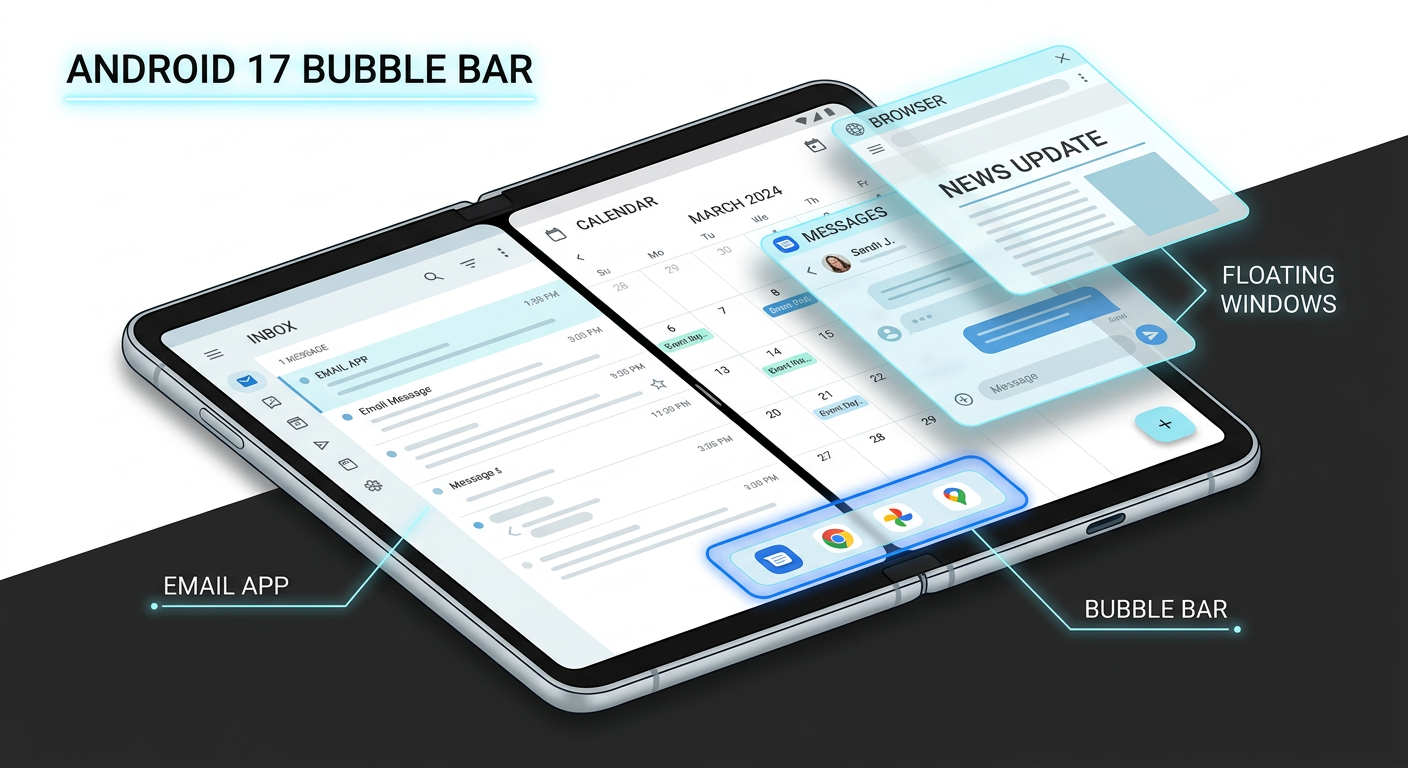
This dock makes switching between floating states completely seamless. You can run two apps in a native 50/50 split-screen while keeping a floating calculator and Slack channel pinned on top.
The Adaptive-First Mandate for Developers
For developers, Android 17’s windowing shift is more than just a UI skin—it is a new architectural standard.
To support App Bubbles and the Bubble Bar, Google is enforcing an adaptive-first development paradigm. Apps targeting Android 17 (API Level 37) can no longer opt out of resizability or orientation constraints on large screens (screens with a width greater than 600dp). Traditional manifest workarounds like resizeableActivity=false or locked screenOrientation values are now ignored by the system.
Developers must leverage tools like Jetpack Compose and reactive window states to ensure their layouts gracefully transition from a tiny, floating 200dp App Bubble to a full-screen tablet canvas.
A Perfect Match for Lifestyle Features
This windowing system beautifully complements Android’s other recent software releases, such as the newly dropped Google Photos "Digital Wardrobe". Using AI to catalog every clothing item in your library, the Digital Wardrobe allows you to mix and match outfits and try them on virtually. Thanks to App Bubbles, you can float your digital closet directly over a group chat, asking your friends for feedback on a virtual outfit preview in real-time.
Android 17 is rolling out now to eligible Pixel devices, with updates for Samsung and other major manufacturers slated for later this year.


Get the wire in your inbox
Every new signal, straight from the generator. No noise, unsubscribe anytime.