Closing the XML Tab Forever: Inside Android's Official "Compose-First" Transition
Google has officially placed the legacy Android View system—including XML layouts, RecyclerView, and Fragments—into permanent maintenance mode. Discover what this monumental "Compose-First" decision means for active projects and the future of Android engineering.

Closing the XML Tab Forever: Inside Android's Official "Compose-First" Transition
For over fifteen years, building an Android user interface meant wrestling with XML layout files, manually mapping UI elements with findViewById, and untangling nested layouts inside heavy, boilerplate-ridden RecyclerViews. That era has officially come to an end. At Google I/O 2026, the Android engineering team formally drew a line in the sand: Android development is now definitively Compose-First.
This isn't just a marketing nudge or a casual recommendation. Google has placed the entire legacy Android View system and its accompanying tool suites into permanent maintenance mode.
What "Maintenance Mode" Means for Legacy Code
To be clear, Google is not deleting the old View system, and your existing production apps will not break overnight. They will continue to compile, execute, and receive critical security patches. However, "maintenance mode" signifies an absolute feature freeze.
- The Sunset of
android.widget: Classic UI classes likeTextView,ListView, andLinearLayoutwill only receive critical stability fixes. No new features or modern design trends (such as Material 3 Expressive styles) will ever be added to them. - Jetpack Deep Freeze: Heavyweight libraries that defined modern Android development for a decade—including
Fragments,RecyclerView,ViewPager2, and the view-based version ofConstraintLayout—are now frozen. - Frozen Tooling: The Android Studio graphical Layout Editor and XML Navigation Editor will no longer receive updates. Moving forward, all new UI design tools inside Android Studio will be engineered exclusively for Jetpack Compose.
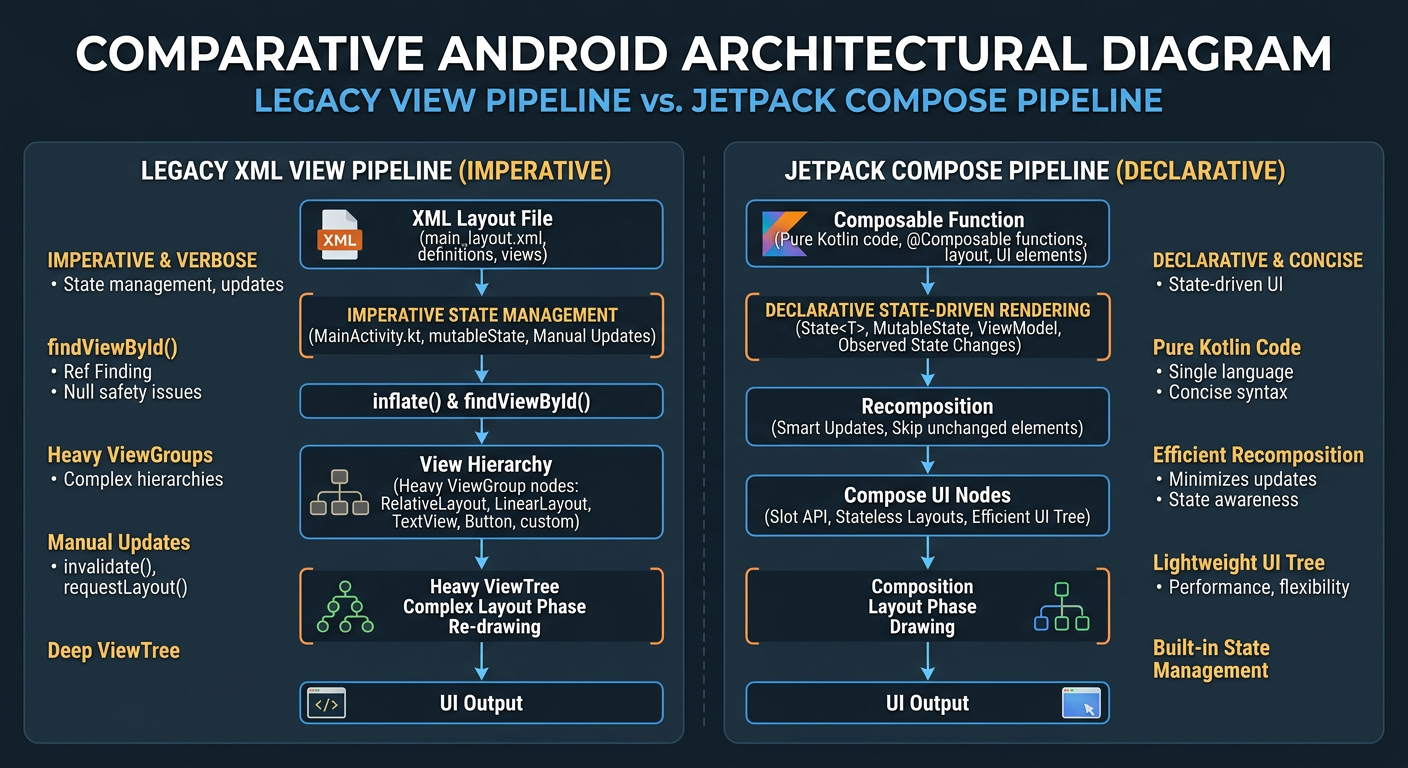
Why the Shift is Irreversible
The primary driver behind this shift is the massive fragmentation of modern hardware. In 2026, Android is no longer phone-first; it runs across foldables, tablets, wearables, Android Auto, and XR platforms. Designing adaptive, responsive UI for this wild hardware spectrum using imperative XML layouts is a notorious architectural headache. Compose makes it seamless, natively adapting layout hierarchies via pure Kotlin code.
Furthermore, Google is heavily prioritizing Kotlin Multiplatform (KMP) and Compose Multiplatform (CMP) to build unified cross-platform UIs. Keeping the legacy View system alive was only slowing down the entire ecosystem's momentum.
Navigating the Compose Transition
For active development teams, the path forward is clear: stop writing XML.
- Enforce a Strict Compose Rule: Commit to building all new features, screens, and dialogs entirely in Jetpack Compose.
- Leverage the Interoperability Bridge: Use
ComposeViewto host Compose UI inside existing XML layouts, andAndroidViewto bring legacy views into Compose screens as needed. - Use the AI Migration Skill: Google has introduced the "XML to Compose Migration Skill" directly inside Android Studio. This tool leverages agentic workflows to analyze legacy layouts and automatically convert them into highly adaptive Compose code.
The message from I/O 2026 is clear: XML is officially the past, and Jetpack Compose is the undisputed standard. It is time to close the XML tab for good.


Get the wire in your inbox
Every new signal, straight from the generator. No noise, unsubscribe anytime.