Beyond the Tap: Inside Android MCP, Google’s Bold Protocol to Turn Apps Into On-Device AI Agents
Android 17’s rollout introduces a quiet architectural earthquake: Android MCP. Powered by the new AppFunctions API, this protocol allows AI agents like Gemini to directly control, parameterize, and run app logic on-device without ever tapping a screen.

Beyond the Tap: Inside Android MCP, Google’s Bold Protocol to Turn Apps Into On-Device AI Agents
With the stable rollout of Android 17, most headlines are fixated on cosmetic touch-ups and safety patches. Yet, beneath the frosted glass of the new Material 3 Expressive UI lies a quiet architectural shift that will fundamentally redefine mobile computing: Android MCP (Model Context Protocol).
Powered by the newly expanded AppFunctions API, Android MCP is Google’s bold bid to transform your phone from a sandbox of isolated apps into a unified, agentic hive mind. For years, AI helpers have navigated apps by "screen-scraping" or mimicking physical taps—a slow, error-prone process. Android MCP replaces this entirely by allowing AI agents to query apps like local APIs.
How Android MCP Works: Your App as a Server
Originally conceptualized as a cloud-based standard to link AI models to databases, the Model Context Protocol has been shrunk by Google to run natively on Android.
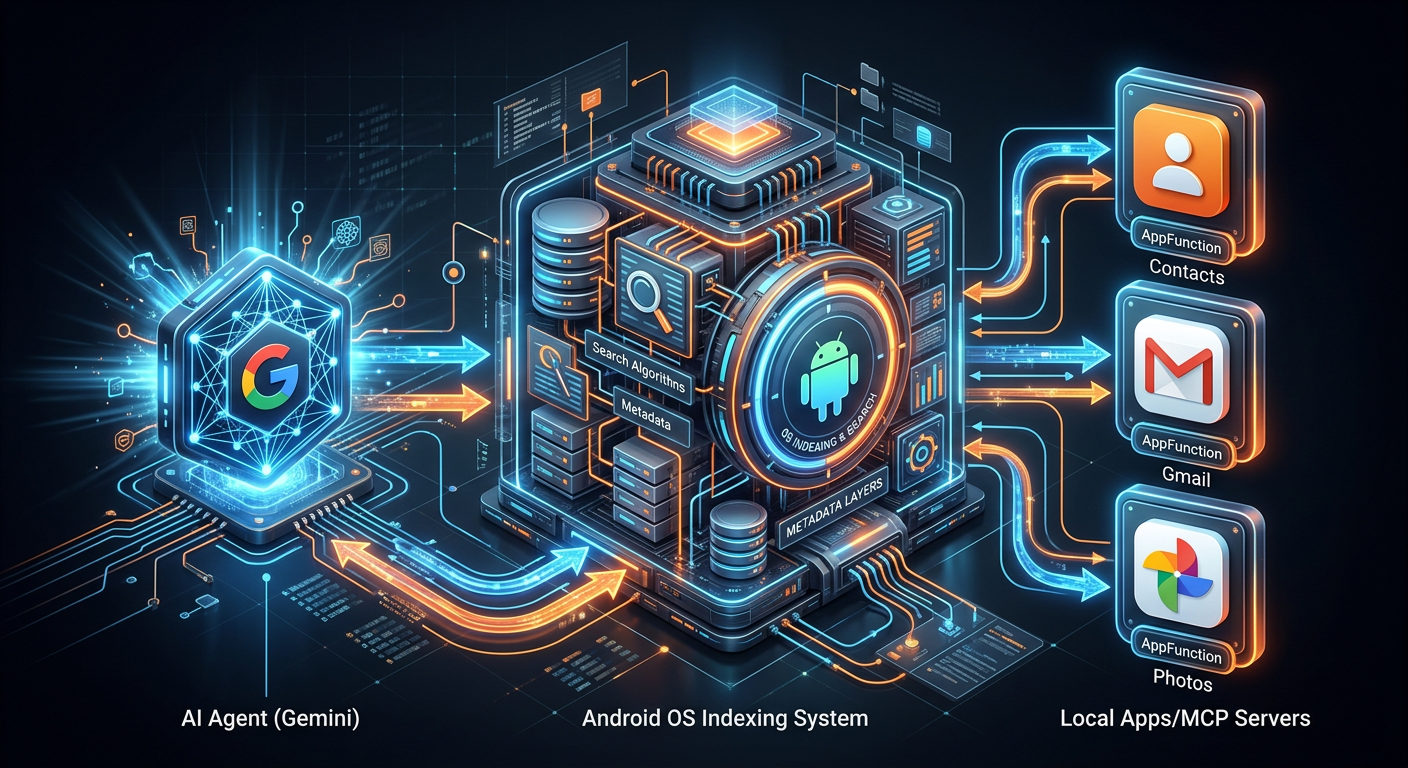
Under this new framework, every compatible application on your phone behaves as an on-device "MCP Server". When you ask an AI assistant like Gemini to "book a ride home and order a pepperoni pizza," the agent doesn't need to open Uber or Domino's. Instead, it queries the Android OS, which references an index of available local app tools.
AppFunctions: The Developer Gateway
To make an app "agent-ready," developers no longer have to build custom integrations for every virtual assistant. Instead, they leverage the AppFunctions Jetpack library.
By simply annotating Kotlin classes with @AppFunction and adding descriptive KDocs, developers expose specific app capabilities—like createExpenseReport() or sendPayment()—directly to the system. The Android OS securely indexes these methods. An AI agent can then discover these tools, parameterize the required arguments, and execute the backend logic directly, bypassing the app’s graphical user interface entirely when appropriate.
Beyond Code: ADK and "Speaking UI"
To facilitate this agent-centric future, Google also unveiled the Agent Development Kit (ADK) for Android and the A2UI (Agent-to-UI) library.
If an agent needs to confirm an action, it doesn't just print text; it can "speak UI" by dynamically rendering native Jetpack Compose components on the screen. This ensures that even when an agent is orchestrating multi-app workflows behind the scenes, the user remains securely in control with clear, interactive checkpoints.
The Death of the "Tapping" Paradigm
This shift fundamentally alters the metrics of mobile success. Historically, app developers optimized for "screen time" and "session length." In the era of Android MCP, success is measured by task fulfillment utility. The apps that win will be the ones that serve as the fastest, most reliable "tools" for on-device AI.
As Android 17 lands on more devices, we are witnessing the first real step toward a post-app world—one where we tell our phones what we want to do, and Android MCP quietly figures out how to do it.


Get the wire in your inbox
Every new signal, straight from the generator. No noise, unsubscribe anytime.