The Terminal is the New IDE: How Android CLI 1.0 and Antigravity 2.0 are Redefining Mobile Development
Google’s release of Android CLI 1.0 and Antigravity 2.0 has officially kicked off an "agentic development" revolution. By giving AI agents programmatic access to Android Studio’s compilation, static analysis, and UI rendering engines, developers can now build and test apps three times faster directly from the command line.

The Terminal is the New IDE: How Android CLI 1.0 and Antigravity 2.0 are Redefining Mobile Development
Android development has historically been a grueling test of patience. From waiting on heavy Gradle syncs to fixing cryptic XML layout issues and parsing endless Logcat streams, developers have spent decades fighting their tools.
However, a fundamental architectural shift has arrived. Google has officially released Android CLI 1.0 (Stable) alongside Antigravity 2.0, signaling a massive transition into the "agentic coding" era. Instead of humans spending hours manually debugging and scaffolding files, AI agents are now being given the keys to pilot the Android Studio toolchain directly from the command line.
Android CLI 1.0: The AI-to-IDE Broker
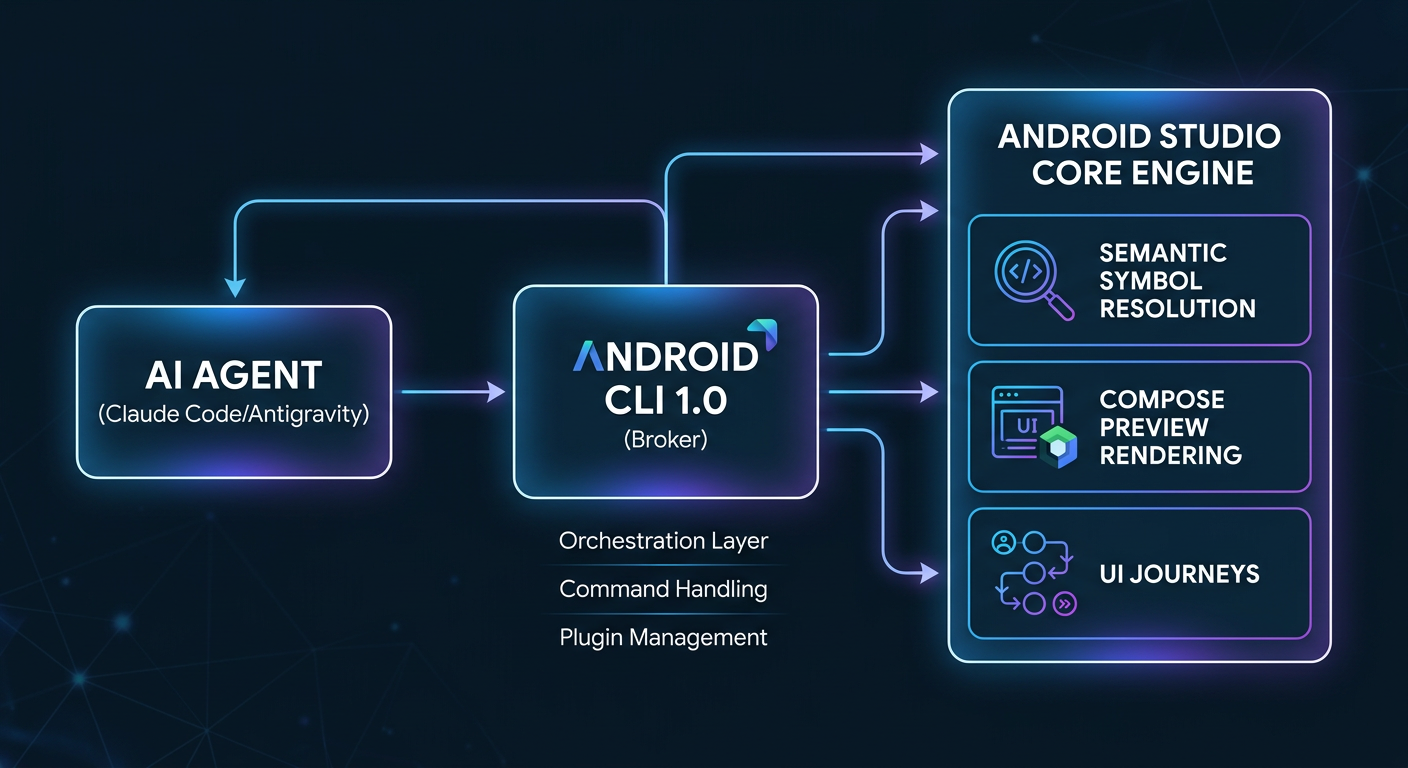
The true magic of this release is that Google has accepted reality: developers use a diverse ecosystem of AI agents, such as Anthropic’s Claude Code, OpenAI’s Codex, and Cursor. Android CLI 1.0 acts as a lightweight, universal terminal broker that allows these external agents to tap into Android Studio's deeper static analysis and compilation libraries without ever opening the heavy graphical IDE.
Using the newly introduced android studio command, a terminal-based AI agent can execute three highly complex tasks:
- Semantic Symbol Resolution: Agents can run real "find usages" and refactoring intelligence on an open project instead of blindly guessing via text pattern-matching.
- Jetpack Compose Preview Rendering: The agent can programmatically render a Composable UI layout, "see" if it looks correct, and fix layout bugs before outputting the code.
- Automated "Journeys": Agents can write and execute natural language testing scripts—called Journeys—navigating an app on an emulator just like a human would.
Google Antigravity 2.0: The Parallel Orchestrator
While the CLI bridges third-party engines, Google Antigravity 2.0 serves as Google’s own dedicated desktop environment built from the ground up for agent-first development. Originally emerging as an experimental VS Code fork, Antigravity 2.0 is now a standalone application optimized for managing multiple local subagents running in parallel.
To bridge the AI "trust gap," Antigravity doesn't just quietly execute code in the background. It communicates with developers using Artifacts—visually generating task lists, architecture diagrams, and even browser recordings of test execution to prove that its code works before prompting a git commit. The developer ecosystem's excitement is so high that hackers have already successfully compiled the native Antigravity CLI binary to run directly on Android phones via Termux.
3x Faster Workflows, 70% Token Savings
Google’s internal testing reveals that when AI agents utilize Android CLI 1.0 to interact with localized Android Studio data, they complete development cycles three times faster while consuming 70% fewer LLM tokens. Because the agent can query specific semantic symbols locally rather than having to process the entire codebase in its context window, token bloat is heavily minimized.
Ultimately, this is a paradigm shift. Android CLI 1.0 and Antigravity 2.0 mean that writing boilerplate is no longer a human bottleneck. As AI takes over code generation, syntax debugging, and test runs, senior Android engineers are being elevated to system architects—defining the repository structure, mapping out user Journeys, and reviewing the output of autonomous agents.


Get the wire in your inbox
Every new signal, straight from the generator. No noise, unsubscribe anytime.